

 English
 Deutsch
English ✓
Workflows
Settings, Analytics and activation
Settings
The “Settings” tab contains the “Workflow Global Settings”:
- Send all channel communication with highest priority: send all messages of the workflow with the highest priority, e.g. for order confirmations or shipping notifications.
- Observe global contact rules: check the global contact rules for each contact before execution.
Below these are the “Achievements” Gold, Silver and Bronze. They allow the creator of the workflow to define goal levels, e.g. Gold = purchase, Silver = enquiry, Bronze = click; end nodes can be assigned to these levels. You edit or reset the labels using the icons next to them. The levels are not automatically calculated success ratings.
Analytics
The “Analytics” tab shows the evaluation of the workflow. On the left, you switch between “Overview”, “Channels & Actions” and “Snapshot comparison”; at the top, you select the period and apply it with “Apply”.
The overview (“Overview”) shows these metrics:
- Entries: entries into the workflow.
- First Action: entries for which the first action was executed.
- Qualified Response: entries with a qualified response.
- Goal Contacts: contacts who have reached the goal of the workflow (only if a goal is configured).
- Without Observed End: entries for which no end has been observed yet.
- Unique Contacts: number of different contacts in the selected period.
For the first metrics, the number of different contacts (“distinct contacts”) is shown below each value. Below the tiles, “Workflow activity” shows the progression in 5-minute intervals.
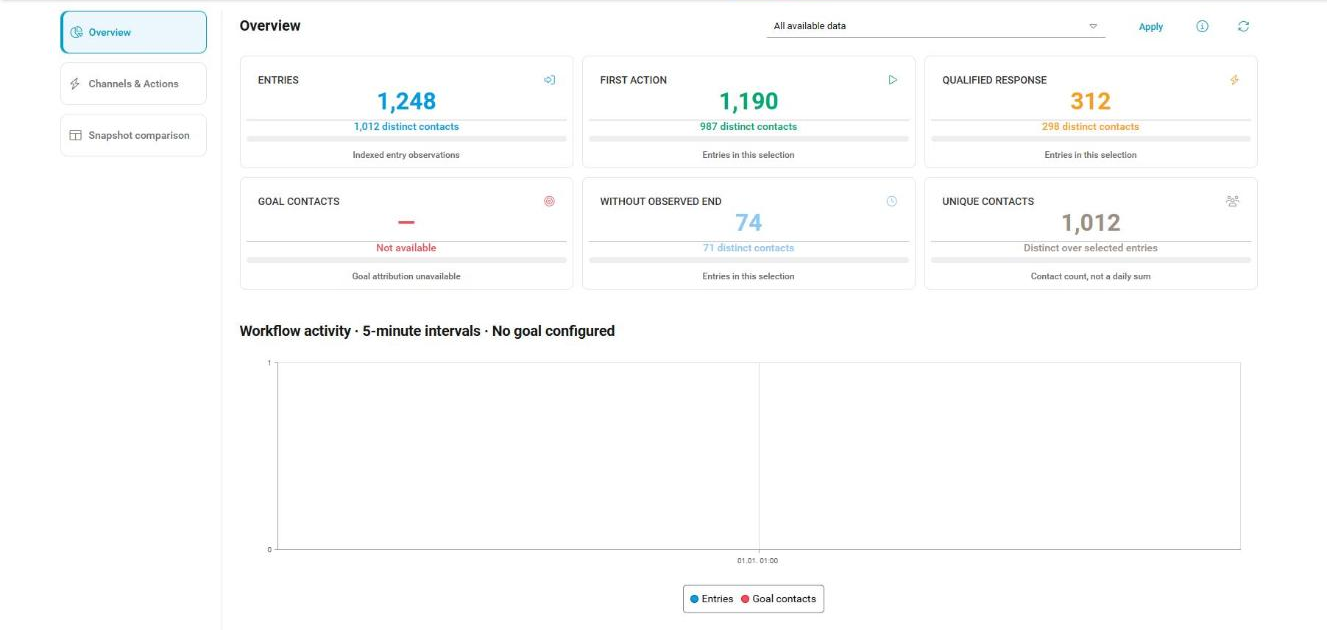
Evaluation of a workflow (Overview) – with sample values
Activation
A new workflow is initially switched off (status draft). You activate it with the OFF/ON switch at the top right (“Activate workflow”). In the overview, the “Status” column shows the state of the workflow.
As long as information is missing, e.g. a trigger without a type, a number on the switch shows the number of open issues.
An active workflow enrols contacts and sends emails. Before activating it, check all nodes, especially the emails and the waiting times.




