

 English
 Deutsch
English ✓
Campaigns › Emails › Overview
Create a new mailing
To create a new mailing (e.g. a newsletter), click “Create Mailing” at the top right. In the selection menu, choose the type of mailing:
- REGULAR: This is a conventional mailing, such as a newsletter send. To act in compliance with the GDPR, the recipient’s consent via double opt-in1 (DOI) is mandatory. This applies to emails that contain advertising.
- TRANSACTIONAL: Also called a transactional email or automated email. This email is triggered by an interaction of the recipient (e.g. an order confirmation or a sign-up or unsubscribe confirmation) and is not sent at a fixed time like a regular mailing.
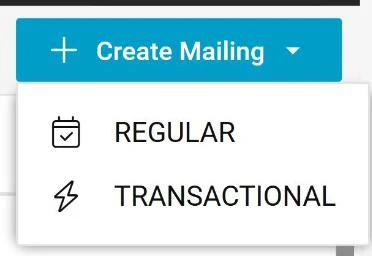
“Create Mailing” selection menu with REGULAR and TRANSACTIONAL
The mailing opens as a form on the right-hand edge of the screen. It has the following tabs:
- Settings: name, subject lines, sender and further options (see “E-Mail Settings”).
- Design: selection and preview of the template (see “E-Mail Settings”).
- Audience & Schedule: subscription, target group and send time – REGULAR only (see “Audience & Schedule”).
- Analytics: evaluation of the mailing (see “Evaluate the reporting data”).
The mailings you create are listed in the overview. The “Status” column shows the state of each mailing with an icon.
The “Save” button at the bottom right is greyed out as long as mandatory information is missing. After saving, the mailing has the status “draft”.
In the “E-Mail Campaign Name” field, you assign a unique name. It must be at least 3 and at most 255 characters long.
The settings are described in the following chapters.
Topics in this chapter
E-Mail Settings
Define the name, subject lines and sender details of a mailing.
Audience & Schedule
Select recipients and set the send time or recurrence.
Status: ACTIVATE, PAUSE & FINISH Mailing
Activate, pause or finish a mailing.




