

 English
 Deutsch
English ✓
Workflows
Example: birthday workflow
The following example shows a workflow that sends contacts a birthday greeting email with a gift and reminds them of the gift a week later.
- Create the workflow: click “Create Workflow” and enter the name via the pencil icon, e.g. “birthday workflow”.
- Define the trigger: click the “Virtual Trigger” and select “Scheduled Audience”. Subscription “Standard-Newsletter”, target group “Birthdays in the next 30 days”, Frequency “Monthly”. This way, every month all contacts whose birthday falls within the next 30 days receive the email.
- Birthday greeting: insert an Email node below the trigger, e.g. with the name “Birthday greeting” and the subject “Happy birthday – your gift is waiting!”, and select the template in the “Design” tab.
- Wait: below it, insert a “Waiter” with a “Time Delay” of 7 Days.
- Reminder: after the Waiter, insert a second Email node, e.g. “Voucher reminder” with the subject “Your birthday gift is still waiting for you”, and select a template for it as well.
- Save: with “Save” at the top left. The workflow remains switched off until it is activated via OFF/ON.
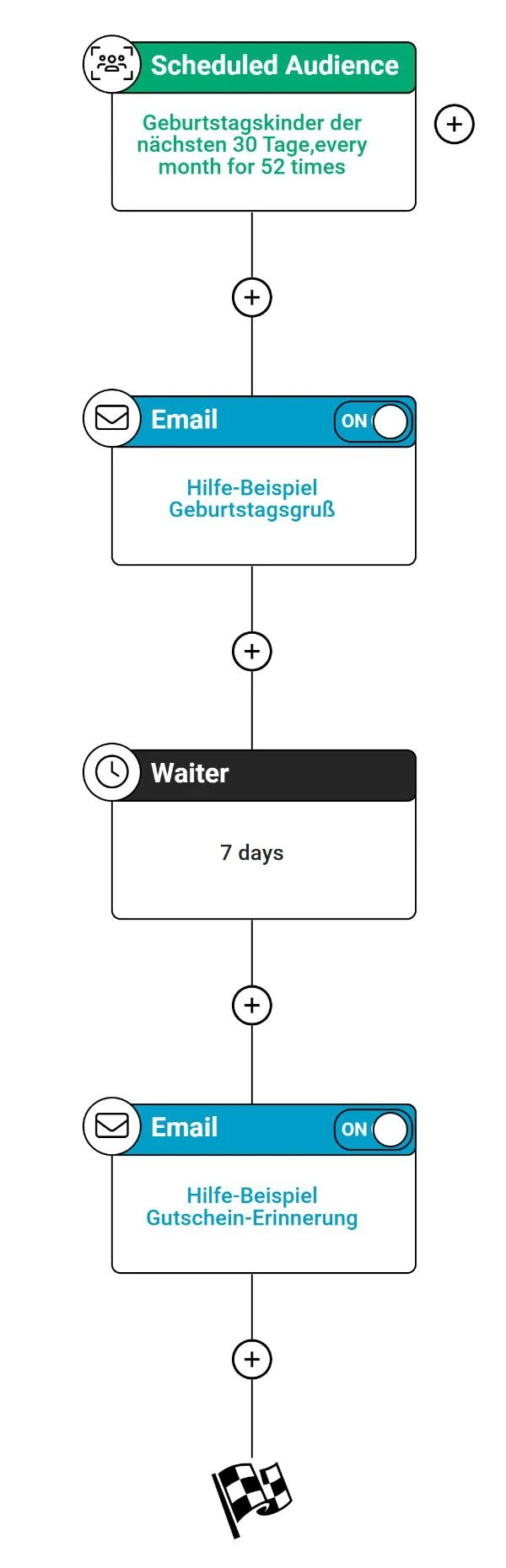
Example workflow “birthday workflow” with birthday greeting email, waiting time and reminder
Note
Once the workflow is activated, its “Analytics” tab shows how the two emails perform (see “Settings, Analytics and activation”).




