

 English
 Deutsch
English ✓
Content › Templates › Create Template › Create an initial template › Block: Content › Content-Block: Text
Datafields and Field Functions
On the one hand, datafields, also called variables, can be used within a text to place values from the customer master data of the database in a text. A well-known example of this is the salutation, where instead of, for example, “Hallo Max,” a variable is used, e.g. “Hallo {{customer.Vorname}}”. During the sending process, the position {{customer.Vorname}} is filled with the value from the database, in this case the field “Vorname” (first name). The salutation is thus personalised: Hallo Max,
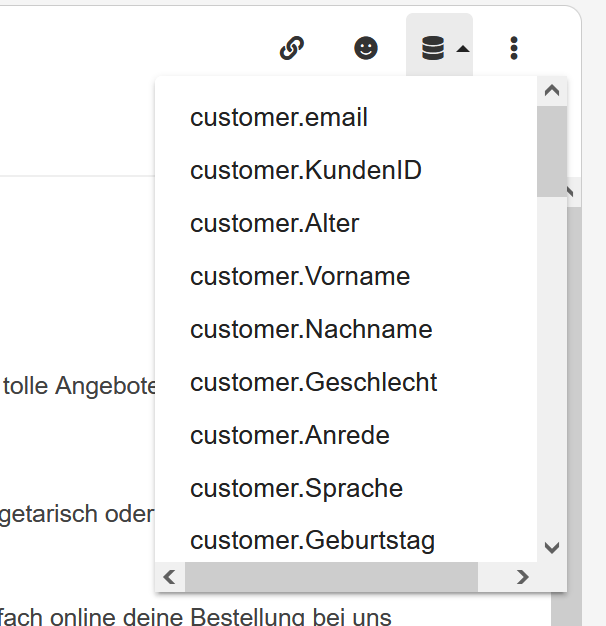
Datafield or variable in the selection menu
Another way of personalising a mail is to use so-called field functions. These are programmatically created functions that can be integrated into the template via a selection list. These functions are individual and structured differently for each customer. In the selection list, field functions can be recognised by the prefix “fn.”; in the template they appear as placeholders with an angle bracket, e.g. {{>AnredeLiebe}}.
You can create an individual field function yourself. You do this in the menu on the left under “Content › Field Functions” (see chapter “Field Functions”).
In a template, the recipient is to be addressed by their surname with the gender-specific salutation “Lieber / Liebe” (Dear). For this purpose, a field function {{>AnredeLiebe}} is integrated into the salutation and is later filled with the surname and the correct salutation: “Lieber Herr Mustermann,” or “Liebe Frau Mustermann,”.
If you are unable to create an individual field function yourself via “Field Functions”, you can contact the AIC Group. The field function is then created specifically for the customer!




