

Marketing Automation Studio

Flag United Kingdom English
Flagge Deutschland Deutsch
Flag United Kingdom English ✓

Administration › Data Schemas › Customer

Create a customer data schema

The customer schema here must match the schema used in production. The table headings and data types (String, Number, etc.) should be a 1:1 copy so that a correct test (sending emails with different parameters, e.g. characteristics/conditions) can be carried out.
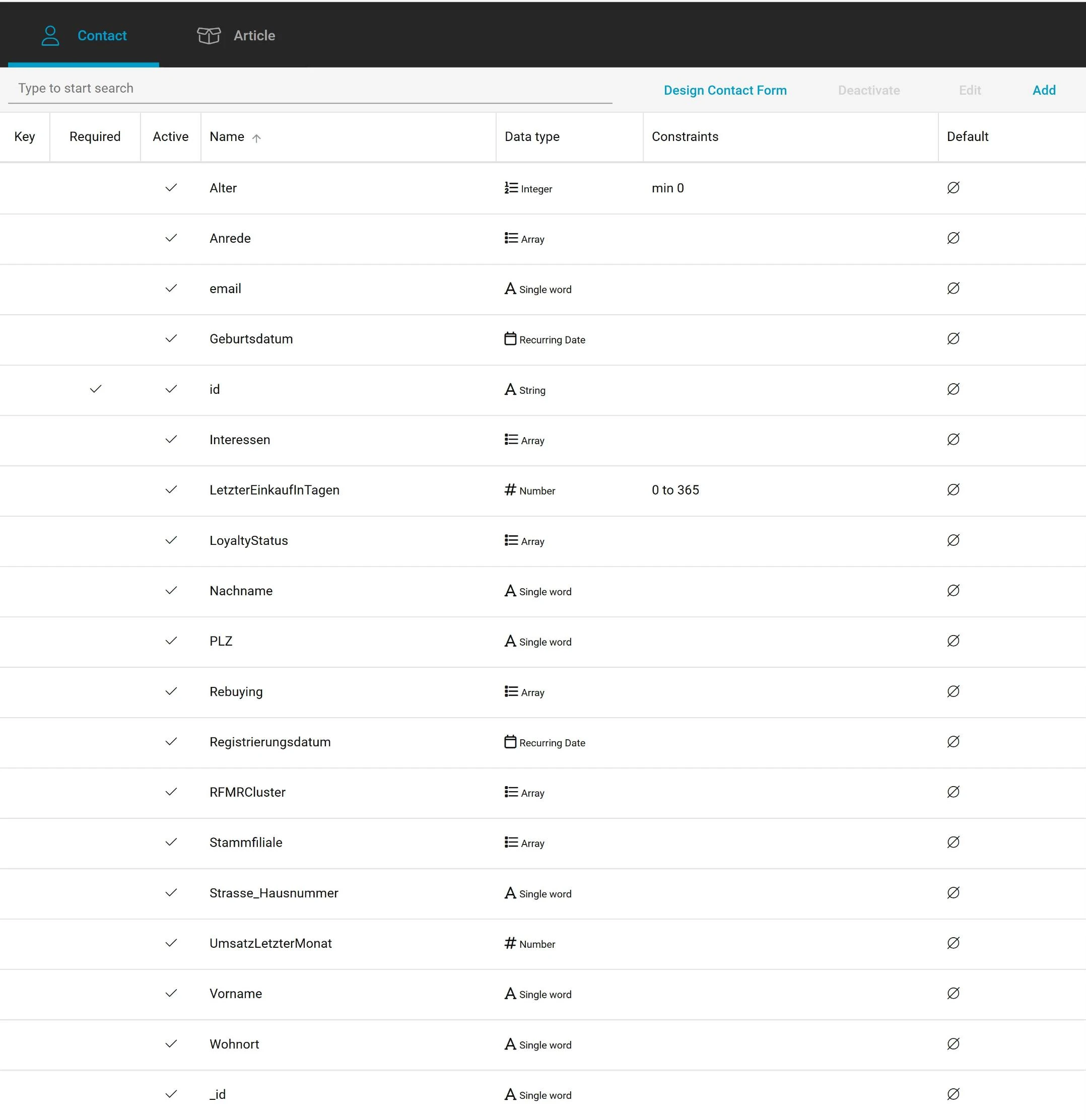
“Contact” tab under “Administration › Data Schemas”

At the top are the buttons “Design Contact Form”, “Deactivate”, “Edit” and “Add”. The table shows the fields with the columns “Key”, “Required”, “Active”, “Name”, “Data type” (e.g. String, Single word, Number, Integer, Array, Recurring Date), “Constraints” and “Default”.
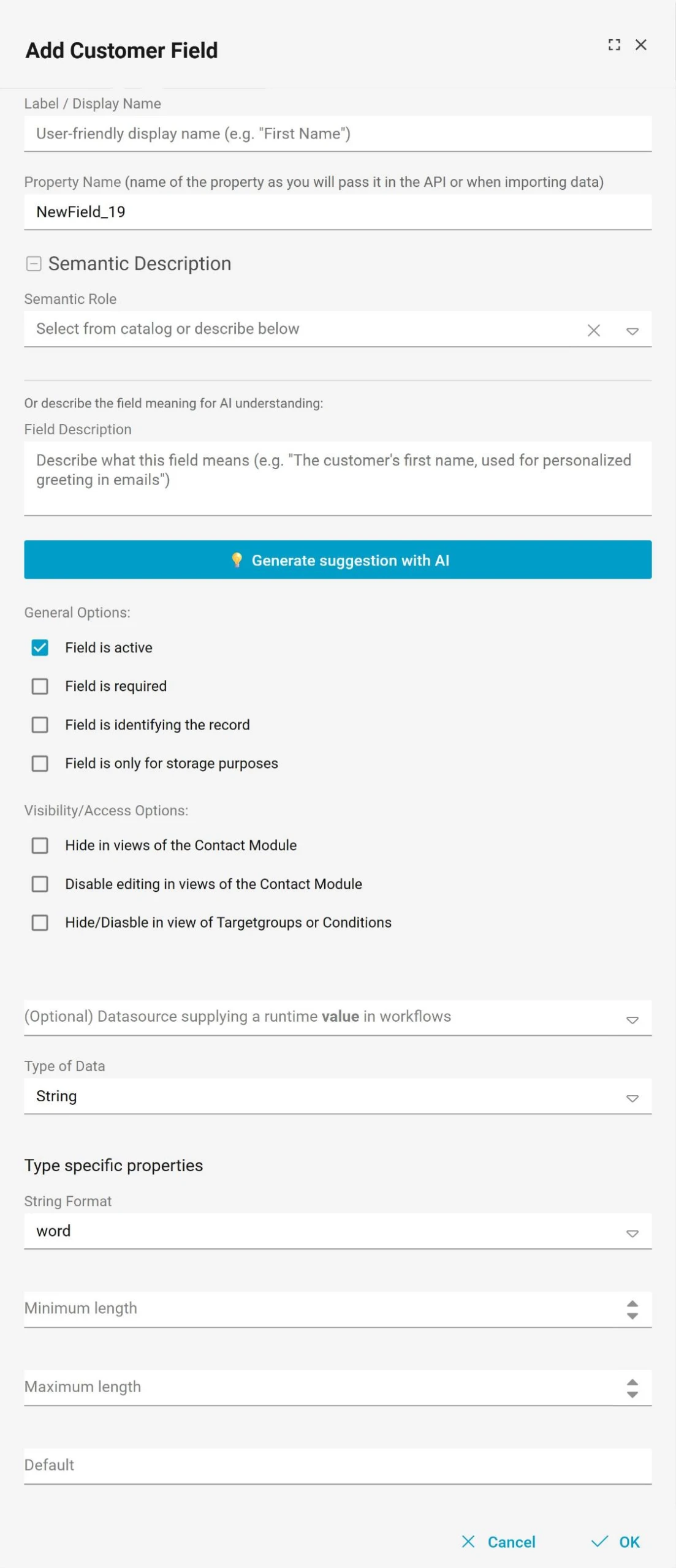
“Add Customer Field” form

“Add” opens the “Add Customer Field” form. It contains the following areas:

  • Label / Display Name: displayed name of the field, e.g. “First Name”.
  • Property Name: name of the field as used in the API and for data imports.
  • Semantic Description: business meaning of the field – selected from a catalogue (“Semantic Role”, e.g. email address) or entered as a free description (“Field Description”). The Semantic Role lets services and assistants find the right field regardless of the technical field name; it is not an access or permission role. “Generate suggestion with AI” creates a suggestion using AI.
  • General Options:
    • Field is active: the database field can be activated or deactivated here.
    • Field is required: the database field is required/not required.
  • Field is identifying the record: marks a key field that uniquely identifies the record – where applicable as part of a composite key. Field is only for storage purposes: the field is only stored; it is not available for business use in the modules and is not searchable.
  • Visibility/Access Options:
    • Hide in views of the Contact Module: the database field is shown/not shown in Contacts (see chapter “Contacts”).
    • Disable editing in views of the Contact Module: the database field can/cannot be edited in Contacts.
    • Hide/Disable in view of Targetgroups or Conditions: the field is hidden or locked in “Target Groups” and “Conditions”.
  • (Optional) Datasource supplying a runtime value in workflows: remote service that supplies the value of the field at runtime in workflows (see “Remote Services”).
  • Type of Data and Type specific properties: data type of the field (e.g. String) and type-dependent settings such as “String Format”, “Minimum length” and “Maximum length”.

“OK” creates the field; “Cancel” closes the form without changes.

Fields of the customer data schema

The following overview explains the settings of a customer schema field. Adopt field names, data types and constraints in line with the customer data schema used in production. The examples are for illustration only and are not generally applicable specifications.

Label
Function
Example
Active
Specifies whether the schema field is active. If the checkbox is ticked, the field is active; if it is unticked, the field is inactive.
The Active checkbox is ticked for the field “first name”.
with tick = active
without tick = inactive
Name
Specifies the technical name of the field. It must match the field name in the production customer data schema, including upper and lower case.
The field for the email address is given the name email.
Description
Describes the meaning and intended content of the field. Business-specific details can also be explained here.
For the field “CustomerID”, the description “Unique identifier of the customer” is entered.
Data type
Specifies which kind of values the field can hold. The options are String, Number, Integer, Boolean, Array and variants with or Null. These variants also allow the value null.
The field “first name” is given the data type String, the field “age” the data type Integer.
Unique
Activates or deactivates the uniqueness option for the field value. If true, the option is activated; if false, it is deactivated. If the option is activated, a value may occur only once across all contacts.
Unique is set to true for the field “CustomerID”.
Required
Specifies whether the field is mandatory. If true, the field is mandatory; if false, it is optional.
Required is set to true for the field “email”. This marks “email” as a mandatory field.
Minimum
Specifies the smallest permitted numerical value. The setting refers to the value of the number, not to the number of its digits.
Minimum is set to 18 for the field “age”. Numerical values below 18 are therefore not permitted.
Maximum
Specifies the largest permitted numerical value. The setting refers to the value of the number, not to the number of its digits.
Maximum is set to 120 for the field “age”. Numerical values above 120 are therefore not permitted.
MinLength
Specifies the minimum number of characters in a text value. The setting is used for fields with the data type String.
MinLength is set to 3 for the field “CustomerCode”. “AB” is too short; “ABC” meets the minimum length.
MaxLength
Specifies the maximum number of characters in a text value. The setting is used for fields with the data type String.
MaxLength is set to 10 for the field “CustomerCode”. A text value with eleven characters exceeds the permitted length.
Format
Specifies the intended format of a text value. The options are word, sentence, email, date-time and uri.
Format is set to email for the field “email”. A corresponding sample value is “name@example.com”.
Default
Specifies the default value that the field receives if no value is passed.
The value “name@example.com” is entered under Default for the field “email”.

Overview of the fields in the data schema (Data Schemas)

Do you have any further questions?

Then feel free to send us an email

Basic information about our services on our website


Marketing Automation

The all-in-one platform for automated dialogue marketing

Agentic AI – Roboter mit Gehirn

Agentic AI

AI agents that take specialist work off your teams

Business Intelligence

Data expertise for precise decisions

Blog

Current articles on Marketing Automation, Agentic AI and Business Intelligence

↑

Schreiben Sie uns

Sie haben eine Frage, eine Anregung oder Feedback zur Online-Hilfe? Wir freuen uns auf Ihre Nachricht. Name, E-Mail-Adresse und die Bestätigung der Datenschutzerklärung sind Pflichtangaben.

Write to us

Do you have a question, a suggestion or feedback about the online help? We look forward to your message. Name, email address and confirmation of the privacy policy are required.

Ihr Feedback

War diese Seite hilfreich? Ihre Rückmeldung hilft uns, die Online-Hilfe weiter zu verbessern.

WordPress Cookie Notice by Real Cookie Banner


